
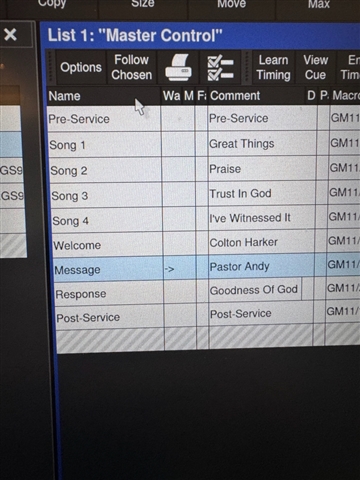
Good day! See the attached picture. I had a volunteer at the church who made some changes to the column header size and now I can't see some and I have tried everything to recover them. Is there any way to reset them all to a default size?

Good day! See the attached picture. I had a volunteer at the church who made some changes to the column header size and now I can't see some and I have tried everything to recover them. Is there any way to reset them all to a default size?
You should be able to adjust the width of the columns by dragging the bar that separates them in the header. If there are missing columns you can right click in any of the column headers and select Show...
Make sure to re-record the view to save the changes you make.
Thanks. I have all of the columns showing but they are so small that I can't access them. Is there any way to default size them all so I can fix this?
What software version are you running? You shouldn't be able to make the columns that small. If you hover over a vertical bar between two column headers the cursor should change to sideways arrows which allow you to drag the column width.
Otherwise there's not really a reset. If you haven't recorded over the default View 2 labelled Master, that'll open a default version of the Master Window. But you'll have to rebuild your show view around that.
What software version are you running? You shouldn't be able to make the columns that small. If you hover over a vertical bar between two column headers the cursor should change to sideways arrows which allow you to drag the column width.
Otherwise there's not really a reset. If you haven't recorded over the default View 2 labelled Master, that'll open a default version of the Master Window. But you'll have to rebuild your show view around that.
www.etcconnect.com