Issue ArtNet connection with Macbook m2 + nomad

Hi Everyone,

I have been in this space only recently and have very basic knowledge of networking — so far I have always worked with direct DMX signal. Today I am facing a troubleshooting situation at a venue, so let me try to explain:

The venue team is unfortunately not here for the setup, so they passed me the following information:

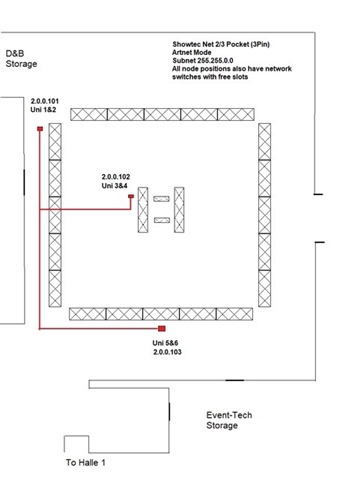
Showtec Net 2/3 Pocket (3-Pin)
ArtNet mode
• Subnet: 255.255.0.0
• Uni 1 & 2 → 2.0.0.101
• Uni 3 & 4 → 2.0.0.102
• Uni 5 & 6 → 2.0.0.103
All node positions also have network switches with free slots.

When I connected via Ethernet cable to my MacBook, it first registered a randomly generated IP address, so I changed it manually as shown in the pictures:
• IPv4: Manual
• IP: 2.0.0.102
• Subnet: 255.255.0.0
• Router: (left empty)

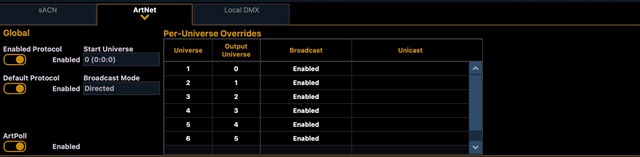
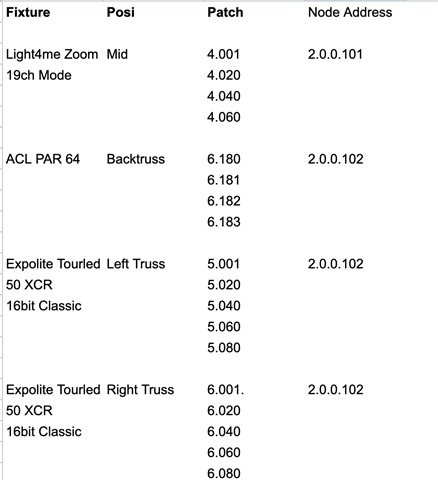
Below you can also see what I have in the console.

Unfortunately, I still cannot get it to work. The venue normally uses grandMA2 and they said it always works with these parameters — so I must be missing something.

Is there anything I should double-check or any additional setting to look at on my MacBook?

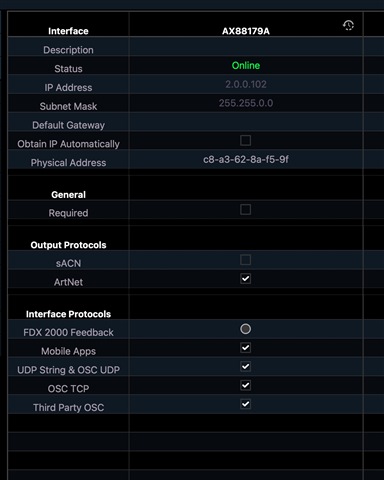
P.S. In the ETC console shell, I left only ArtNet checked.
Parents
  • I think the issue you may run into is that the network does not have a DHCP server and your macbook is giving itself a link local address it's the one in the 169.254.0.0/16 range (Maybe it is that random address you saw)

    You assigned your Computer the same address of one of the nodes, Instead you need to give it an address in the same subnet. like 2.0.0.2

    You could then try to ping your nodes. open terminal and type: 'ping 2.0.0.102' and see if it responds.

    Not sure if this does the trick. But that's what I noticed.

Reply
  • I think the issue you may run into is that the network does not have a DHCP server and your macbook is giving itself a link local address it's the one in the 169.254.0.0/16 range (Maybe it is that random address you saw)

    You assigned your Computer the same address of one of the nodes, Instead you need to give it an address in the same subnet. like 2.0.0.2

    You could then try to ping your nodes. open terminal and type: 'ping 2.0.0.102' and see if it responds.

    Not sure if this does the trick. But that's what I noticed.

Children
No Data
Related