EchoTouch - Preset Times

Hello,

We are looking to have separate fade up/down times for the Presets. Currently, it appears there's only one timing for up/down per preset. Is there a way to implement this?

Thanks.

Parents
  •  
    There is currently no split time fade option.

    However as a potential solution you could build 2 Presets with the same content and apply different fade times to them.
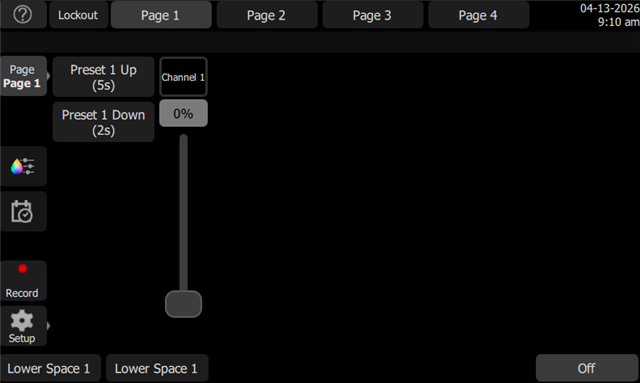
    Essentially making a Preset X Up and a Preset X Down and then have two buttons on your screen. And I would label them as such.
    Now technically it'll still be a toggle button so if you tap the Up again it will fade down.

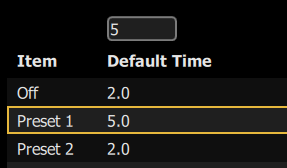
    Reversely you could also put an OFF button and set a different time for that.  But that would turn everything off and not just deactivate a preset in case you had individual zones up still.

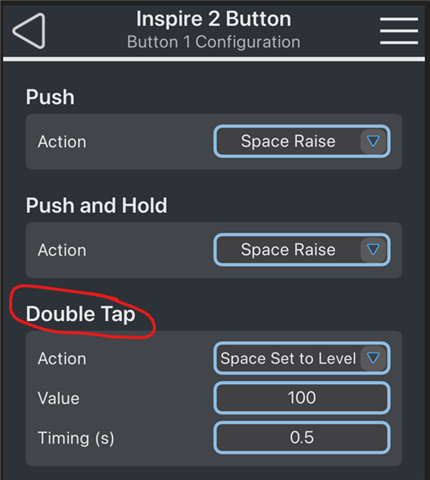
    As a final possibly solution, but I haven't had a moment to try it out.  If everything is in the same space or room, you could set a double tap function of a button to Space Raise with a Timing set.  That should only ever raise the space.  And then a second button of Lower Space with timing.  Both on a double tap.  It should work, but that's usually meant for a button station press, and I haven't confirmed it works on EchoTouch once it's configured.

    Just so we know for future cases.  What is the particular need for a split time, and how much difference in timing are you looking at?


    Examples:


    Echo Access possible solution:

Reply
  •  
    There is currently no split time fade option.

    However as a potential solution you could build 2 Presets with the same content and apply different fade times to them.
    Essentially making a Preset X Up and a Preset X Down and then have two buttons on your screen. And I would label them as such.
    Now technically it'll still be a toggle button so if you tap the Up again it will fade down.

    Reversely you could also put an OFF button and set a different time for that.  But that would turn everything off and not just deactivate a preset in case you had individual zones up still.

    As a final possibly solution, but I haven't had a moment to try it out.  If everything is in the same space or room, you could set a double tap function of a button to Space Raise with a Timing set.  That should only ever raise the space.  And then a second button of Lower Space with timing.  Both on a double tap.  It should work, but that's usually meant for a button station press, and I haven't confirmed it works on EchoTouch once it's configured.

    Just so we know for future cases.  What is the particular need for a split time, and how much difference in timing are you looking at?


    Examples:


    Echo Access possible solution:

Children
Related