Change Color of a fixture in a Cue through OSC

I'll try to explain what I'm trying to do because maybe there is a better way to accomplish my goal.

I currently have a Stream Deck that triggers OSC commands to my CS20AV console. Primarily, I use the "go to cue" function to switch between three different lighting looks. In these cues, I have a couple of fixtures that I want to be able to change the color of through OSC. The issue is that the intensity value becomes locked when I change the color through OSC. Each of the cues has a different intensity value, so I don't want it to become locked.

I did record the cues using color pallets, so I am able to change the colors in the cue that way, but as far as I can tell, I can't change a color pallet through OSC.

I'm curious if anyone has any thoughts on this. Maybe there is a way to do this through playbacks?

Thanks!

Parents
  • Hello, I'm not sure I understand correctly, as the basic problem you're describing seems quite simple.

    I understand that you want to control cues via the OSC, with different intensity and color parameters, which seems to work perfectly.

    You say you want to change colors via the OSC, but in fact, you should be changing cues via the OSC, each containing different colors.

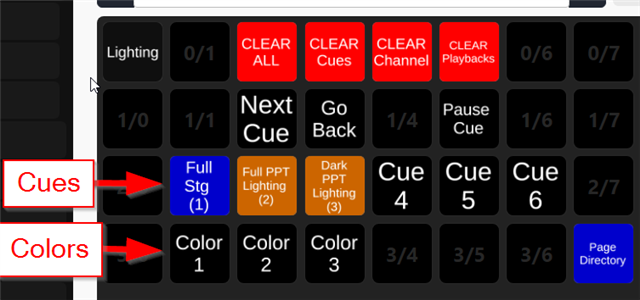
  • My use case is kind of weird here... I want an easy way to update the color of the fixture in those cues from OSC. My idea of this is that my volunteers on a Sunday morning can press a button to change the color of the fixture for that service without having to go in and either update the color palette or reprogram the cues. This may be impossible but I'd figured I'd ask. Here's a layout of my Stream Deck if it helps.

  • Ok, indeed in this specific case, I did not test this cmd. It may not be precise enough, or there may be a bug. If you have detoured the problem, you can always report it in the "feature request" section

Reply Children
No Data
Related