Programming Button Color for MIDI Controller in Luminosus

Hi All,

I recently purchased an APC40 MKII MIDI controller to use in conjunction with my Nomad software for busking and have a few questions when it comes to using Luminosus.  Does anyone know how to map color to buttons in the program?  I've found the control numbers to set the button color, but can't seem to find . way to do so in the program.  This would be super useful for creating groups of looks and palettes to make it easier to remember whats what.  I bought a label maker with the tiniest tape I could find and there is still no way I'm getting labels between the buttons.  Any and all help would be greatly appreciated and thanks in advance to this wonderful community!

Parents
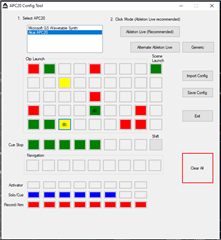
  • Unfortunately, as of now this isn't possible in Luminosus.   The only output from Luminosus to the buttons is a NoteOff after you push a button.  The only workaround that I have been able to find is to set the colors "ahead of time" using a custom utility I wrote.    It works OK, but you have to turn off "Send Feedback" as it will reset the button color, and it isn't dynamic based on things happening in EOS.

Reply
  • Unfortunately, as of now this isn't possible in Luminosus.   The only output from Luminosus to the buttons is a NoteOff after you push a button.  The only workaround that I have been able to find is to set the colors "ahead of time" using a custom utility I wrote.    It works OK, but you have to turn off "Send Feedback" as it will reset the button color, and it isn't dynamic based on things happening in EOS.

Children
Related