
Is Eos software Turing complete?

I was wondering if you could use events and macros to simulate a Turing machine on Eos. I know events can be triggered by specific conditions. and macros can do a lot. Perhaps wondering if perhaps using query in macros would allow you to make gates.

Parents


  • EOS is Turing Complete!

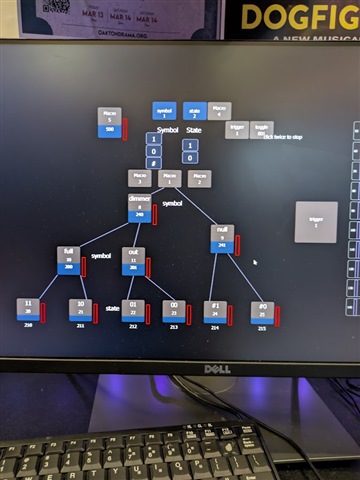
    By using query, show control and macros I was able to simulate a Turing machine with EOS channels. Thanks to https://math.hws.edu/eck/js/turing-machine/TM.html for the rules I used. I have attached a video of EOS counting in binary.
    Below I will detail how I was able to get the key elements of reading and writing data.

    writing:

    I set a group for the state, and one for the symbol (using same terminology as the demo I linked), when i needed to move the head, i would record group 1 to next or last.

    reading: 

    by far the coolest part of this. to read data from a channel we take the following steps (with some variation to keep data but that's unimportant here):

    1. <target to read> Query Intens Full (or other data, I also use the String "Type Generic Dimmer" in a macro) ♢
    2. Copy to <flag true ie. 200>♢
    3. Next Full♢

    if the target is full it will set 200 to full if not, it sets 201 to full. this is because of the syntax error that occurs when the selected channel doesn't match the Query. and then I extrapolate from there.
    with show control to trigger other macros when the associated sACN address is triggered by the if statement.

    Below I have linked pictures of every macro I used as well as a flowchart showing the whole machine in detail.

    Drive folder 

    Gist with the flowchart (in progress)

    I would say doom is next but I already did that by using the file explorer from Concert to be able to run files like the doom.exe
Reply


  • EOS is Turing Complete!

    By using query, show control and macros I was able to simulate a Turing machine with EOS channels. Thanks to https://math.hws.edu/eck/js/turing-machine/TM.html for the rules I used. I have attached a video of EOS counting in binary.
    Below I will detail how I was able to get the key elements of reading and writing data.

    writing:

    I set a group for the state, and one for the symbol (using same terminology as the demo I linked), when i needed to move the head, i would record group 1 to next or last.

    reading: 

    by far the coolest part of this. to read data from a channel we take the following steps (with some variation to keep data but that's unimportant here):

    1. <target to read> Query Intens Full (or other data, I also use the String "Type Generic Dimmer" in a macro) ♢
    2. Copy to <flag true ie. 200>♢
    3. Next Full♢

    if the target is full it will set 200 to full if not, it sets 201 to full. this is because of the syntax error that occurs when the selected channel doesn't match the Query. and then I extrapolate from there.
    with show control to trigger other macros when the associated sACN address is triggered by the if statement.

    Below I have linked pictures of every macro I used as well as a flowchart showing the whole machine in detail.

    Drive folder 

    Gist with the flowchart (in progress)

    I would say doom is next but I already did that by using the file explorer from Concert to be able to run files like the doom.exe
Children
No Data
Related