Any way to make cues layer over each other?

Beginner to eos here! I'm trying to figure out how to create a cue that does not affect other cues while it runs. Say I'm running a show and I want to have one cue running a longer fade, while other cues run smaller flashes of lights. As of now, I've recorded the main fade cue and the cues moving the individual lights, however, whenever the individual light cues go, the fade doesn't run - those lights just stay on. I don't want this; I want the individual lights to "layer over" the big fade, so to speak.

If it helps, I don't have a console to run this off of (this is really just a project I'm doing for fun so I can learn), I'm running this all on a Mac with ETC Nomad. Any help or further question is appreciated!

Thanks!
Alexandra

Parents
  • This "layering over" you describe is the default Eos behavior, it's a concept called move-fade. The important thing is to make sure you don't have competing move instructions for the same channels in the long and the short fades.

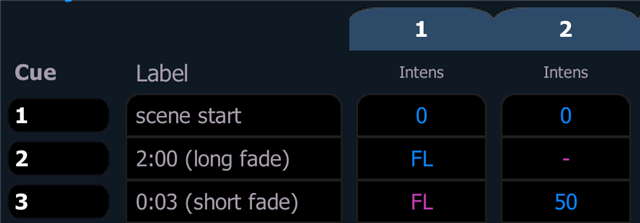
    In this example you can press Go for cue 3 while cue 2 is still running its transition. Channel 2 will do its short fade while channel 1 continues its long one. To make sure this works you have to avoid any move instruction for the long-fading channel in the short cue, i.e. channel 1 needs a magenta value in cue 3 rather than a blue or green one.

    There is also a video explaining concepts like move-fade: YouTube - Why did my console do that?

    Does this help?

  • Just adding some information for clarity.

    A channels color on the channel view determines if a fade is gonna be asserted with a move instruction or not.

    Blue and Green values are Move instructions while Pink indicates Tracked values. Any time a channel is instructed to move to a new value, it is gonna do it in the specified cue timing. Tracked values ignore these timings by default.

    You can get a bigger picture view of whats going on in your Cuelist using the Blind Tracklist (Like in the screenshot above)
    To open the blind Tracklist you need to be in Tab 1 Channels, then enter Blind Mode, then you can use "format" to format over to the Blind Tracklist.

    Hope this helps. 

  • Very helpful, thanks so much! I was definitely overcomplicating this haha tysm

Reply Children
No Data
Related