
EOS "Save failed, unable to write to persistent storage" error.

ETC APEX - Server, backup with clients. Software: 3.3.4.21.

Enoying fault when we save our shows. Warning messages 'EOS "Save failed, unable to write to persistent storage" error.'
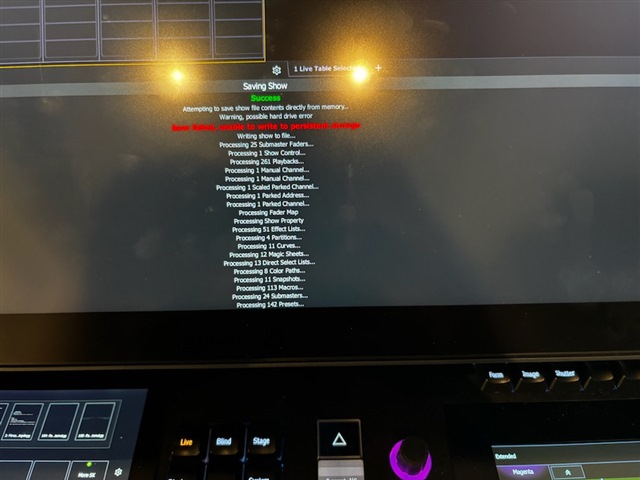
We need to go to server/backup and click to continue. Since we have an APEX in the auditorium, it will be a bit of a run up to server/backup when we save our showfiles.

We have received tips before that there may be something wrong with the file and have tested loading only parts of the file to see if there is any part that needs to be redone.
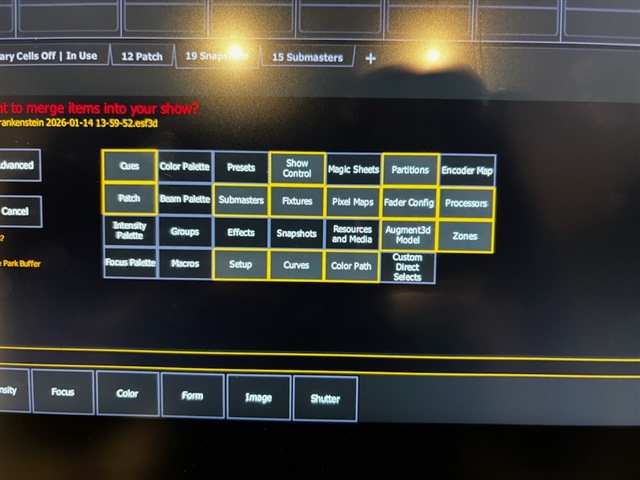
If we only select one of the yellow ones, we will not get the error message when we save. If we select one of the unselected ones, we will get the error when we save. It doesn't matter if it's 1st, 4th or all. 

Any tips on how to get rid of this or avoid having to press "continue" on server/backup?

We've had this on several versions before, so it's nothing new for 3.3.4.21. We've just tried to understand what's wrong again.

Parents
  • Great work testing all those categories! Can you send us showfiles logfiles (or a cloud link if it's a large file) to eos(dot)moderator(at)etcconnect(dot)com, so we can take a look?

    Thank you.

    (Edited showfiles/log files)

  • Thank you. This is a good news bad news situation.

    The reason you're running into this is that the showfile expects some imported custom images to be part of the showfile, unfortunately those images are not there anymore. The good news is that we can help you make sure those issues that interrupt your file save process go away. The bad news is that those images are gone since you first started having the issues.

    The images are 15 custom gobos and 1 magic sheet image.

    To delete the references to the gobo files in your showfile go to File > Import > Gobos > Imported Gobos. You will see 15 files. You will have to select each file individually and type [Delete][Enter].

    To delete the reference to the magic sheet image open a magic sheet, enter Edit mode, click the postcard to show your imported images, click the pencil icon at the top to open the Resource Manager. There you select the single file ("016 ..."), click the Delete command and confirm. Exit edit mode.

    Now your showfile should save without interruption.

    We're currently planning to make a small change to the Eos software to improve the error message you see/saw. This is being tracked as [EOS-52843] and i'll add a note that this affected you as well.

    Hope this helps!

Reply
  • Thank you. This is a good news bad news situation.

    The reason you're running into this is that the showfile expects some imported custom images to be part of the showfile, unfortunately those images are not there anymore. The good news is that we can help you make sure those issues that interrupt your file save process go away. The bad news is that those images are gone since you first started having the issues.

    The images are 15 custom gobos and 1 magic sheet image.

    To delete the references to the gobo files in your showfile go to File > Import > Gobos > Imported Gobos. You will see 15 files. You will have to select each file individually and type [Delete][Enter].

    To delete the reference to the magic sheet image open a magic sheet, enter Edit mode, click the postcard to show your imported images, click the pencil icon at the top to open the Resource Manager. There you select the single file ("016 ..."), click the Delete command and confirm. Exit edit mode.

    Now your showfile should save without interruption.

    We're currently planning to make a small change to the Eos software to improve the error message you see/saw. This is being tracked as [EOS-52843] and i'll add a note that this affected you as well.

    Hope this helps!

Children
No Data
Related