

Color Picker ft. Pending and Active Indicators
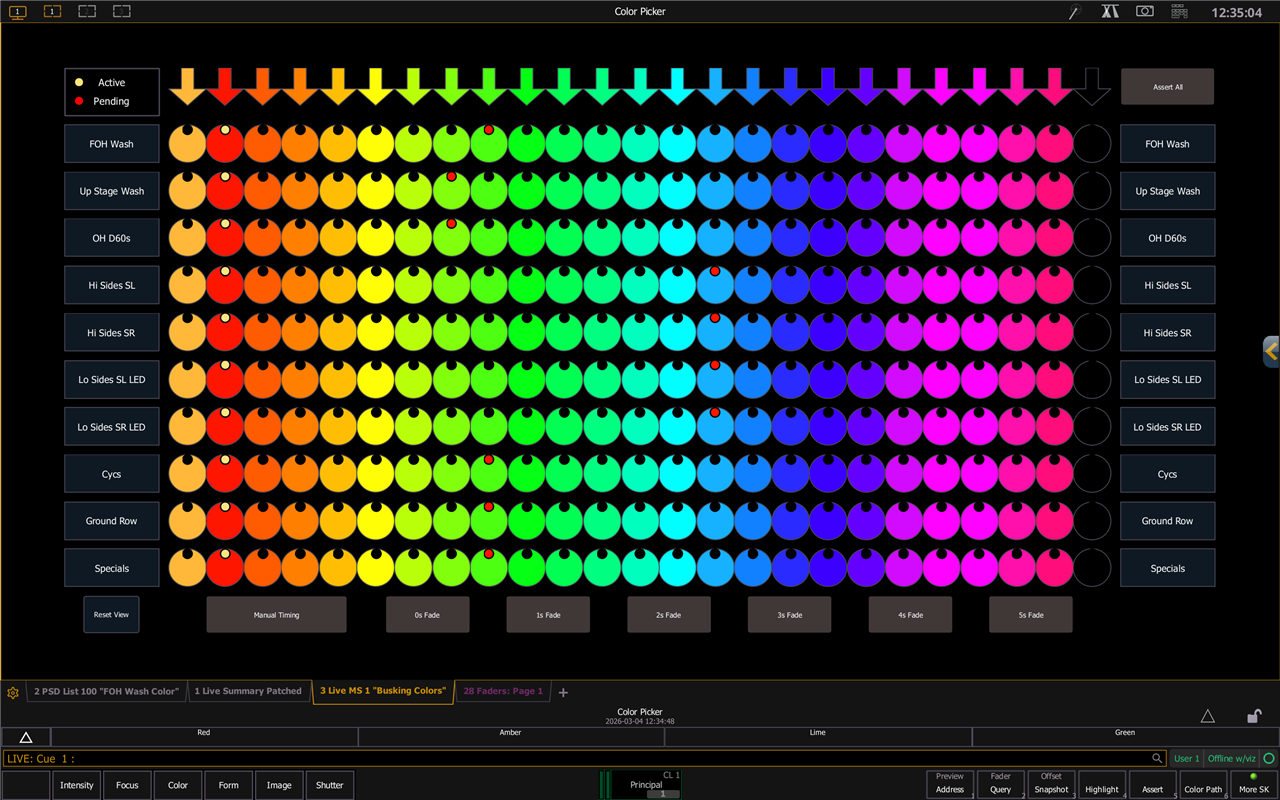
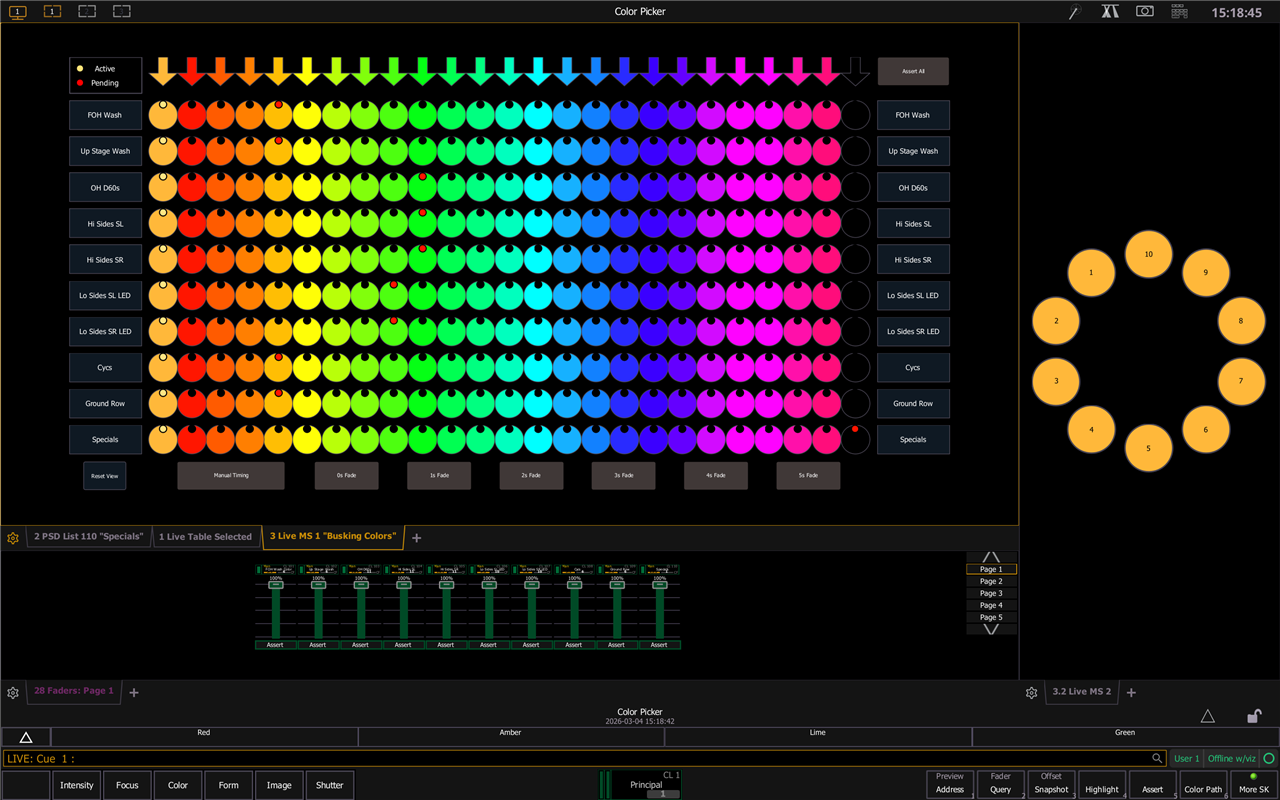
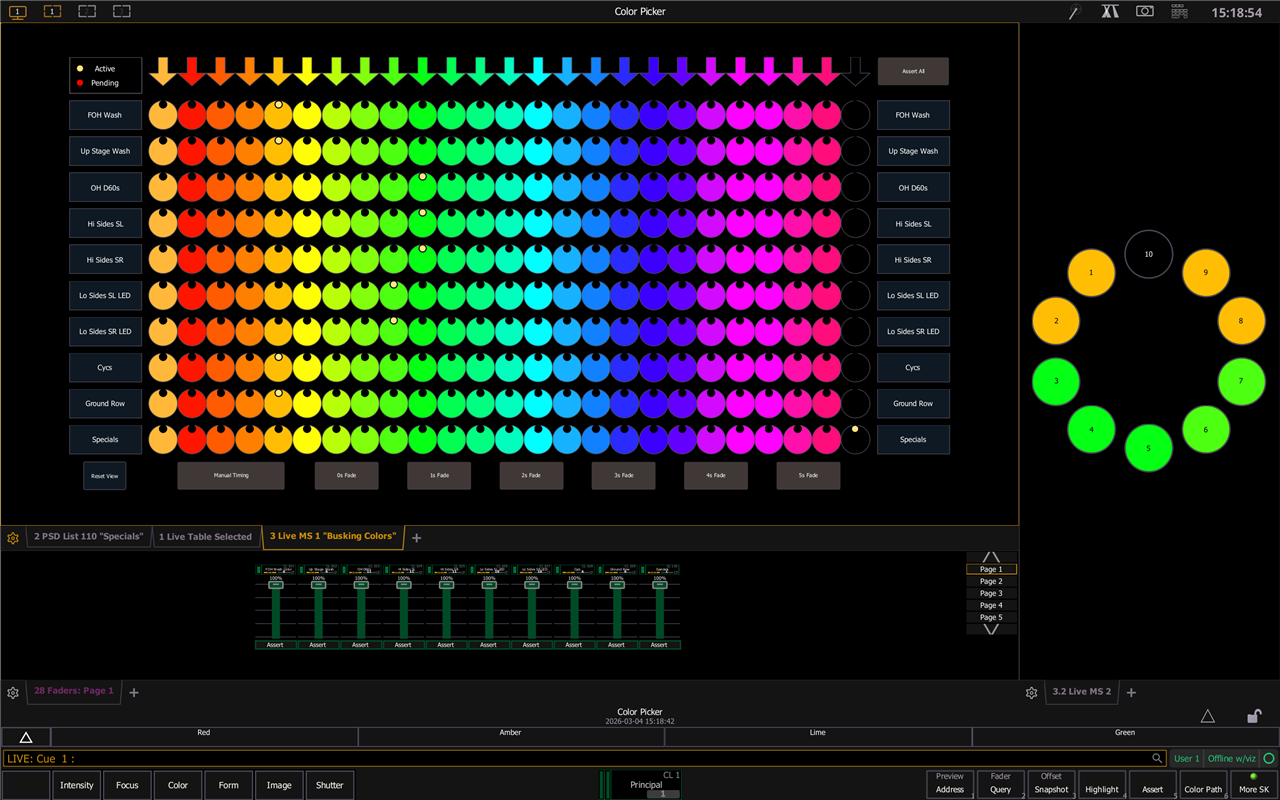
It's a standard grid color picker, but better: it shows what color is active on a system, and what your next selected color is (if you're in manual mode).
Usage notes
You can swap between manual (on a fader) or timed fades. The color picker itself is entirely cue-based; the only macros are to adjust timing settings, and to assert all faders if in manual mode.
I was recently hanging out with an MA3 programmer for a busking show, and envying their color selection grid. I went home and spent the next few days working on this setup, which I'm pretty happy with. It's based off of Mark LaPierre's eos busking template tutorial, so the general sense of what's going on with the cue lists should be answered in there.
How to use
To use it in a show file of your own, you'll need to import:
- fixtures (you'll need the dummy fixture profile)
- patch (again, for dummy channels)
- groups
- or you can use your own here; just be sure to
- assign your filters on the cue lists
- update the group buttons on the sheet
- or you can use your own here; just be sure to
- cue lists 100/ thru 110/
- if you put them somewhere else, you'll have to update the magic sheet; this isn't entirely painful, but it's not nothing
- macros
- 100 to assert all cue lists
- 101 thru 107 to change cue timing
- color palettes 1 thru 25 if you want to
- you can use your own if you want, but they won't match what the magic sheet shows
- i'll fix that someday
- fader config if you want to
- you just need to have cue lists 100/ thru 110/ mapped to faders, you can easily do this yourself wherever you want
Action Pics
Gripes/Bugs/Todos/Other Notes
- The indicators are done with a dummy channel in each cue list, and point cues to manage setting the dummy color before setting the fixture color. I think that in retrospect I could have done this with part cues, which could be a little more elegant.
- Also on the future list: assigning the cue selection circles by a color palette inside of the cue, rather the hard-coded situation that I have at the moment. I think this is trivial by adding an rgb cell to the dummy channels and including it in the color palettes up front, then putting another circle object behind the (transparent) cue selector to reference that channel.
- Asserting all faders is pretty slow, because I can't select multiple cue lists at a time - this means that I have to step through each one in turn. Same with the timing selection macros, although I find that less problematic.
- if I were firing multiple color changes at one time off this chart, I would do it with fader buttons and multiple fingers
- If you look at the macros, you'll see a lot of repetition. My kingdom for variables in eos macros!
- I included the macros that you would need to massage parts of the showfile back into working, because they're what I used to get everything formatted. There's no documentation (apart from one text file I wrote for m10099, which I'm including here), and style/ideas are a little varied, but it worked well enough for me.
MACRO 10099 Set Up Color Picker Cues

This was my thought process while writing m10099; I made some changes after the last round of pseudocode in this document, which you can see in the showfile itself but not here. I hope it's interesting to see how I arrived where I did with the macro.

#     HOKAY SO here's what we need to do

the pending cue gets color palette 1002
that cue
* has a time of 0
* auto follows onto the .1 after it.
  - the .1 has a time of Manual (this can be changed by macros later, but we're not worrying about that rn)

the .1 cue: everybody gets Inactive. then the relevant channel gets Active.

after applying color palettes, we have to apply "Make Null" to each of the following cues in the stack. preceding should be okay, because there's no data until the first move instruction (to pending)
this is probably best done by selecting the next cue thru the end of the list, and then we can apply Make Null on our current operating channel.

fix up cue timing and following

as usual in eos macros, state is a massive problem.


problems arose!

every time I write a .1 cue, after writing the Pending color palette, I need to make every other pixel in the cue null. this is more important than the other Make Null that I wrote, perhaps entirely supplanting the necessity. rows not columns.


#     TODO
clear other pending cues, if you change your mind. e.g. click red on Hi Sides SL, but then decide you want them blue - both currently will retain a selection indicator. I think this is fixable with a Query selector.
Query Is In Color Palette 1003   || can't select by being in "Pending", because eos is in the .1 cue just stuck at the very beginning bc manual timing.
                                 || therefore, we can see the currently Pending (to us) palette by searching for cp1003, "Active"
we do need to also do this query to _not_ grab items that are in active but _completed_ in their cues, because that would take away the color of the active cue indicator which we worked so hard to maintain.

NEVER MIND ALL THAT QUERY STUFF all i had to do was limit my Make Null to the White channel, so that selecting a new Pending cue douses every other red


finish writing macro 10096, to populate all the executes on cue list 100/


#     Pseudocode attempt 4
clear all existing cue data for g19101 in q1 thru q25
set time to 0 for q1 thru q25

create 0.1 clones of cues
reset to cue 1

select g19101.1
clear command line

# BEGIN LOOP (24 times)
Select last   || this will be g19101.1 the first time through, because we preloaded it; future times through will iterate from the end
              || we'll call this PIXEL
PIXEL color Pending (cp2)
-> next cue   || this puts us in the next .1 cue; the first time through, it'll be cue 1.1
g19101.ALL color Inactive (cp1)
PIXEL color Active (cp3)
<- last cue   || go back to the whole number cue for our nullifications; it feels easier than mucking about with Select_Last state shenanigans
g19101.ALL become null
PIXEL color Pending (cp2)
> next PIXEL
-> next cue   || this gets us back to the primary cue we've been operating on
-> next cue   || this puts us in the next whole-number cue; the first time through, it'll be cue 2
clear command line for tidiness

# END LOOP

## Fix up the cues themselves
whole number cues get a Hang 0   || this means that they'll automatically load up their associated .1 cue
.1 cues get a time of manual ** and no hang **   || eos is being a massive butt about this and putting a hang on every cue. idk why.


#     Pseudocode attempt 3
clear all existing cue data for g19101 in q1 thru q25
set time to 0 for q1 thru q25

create 0.1 clones of cues
reset to cue 1

select g19101.1
clear command line

# BEGIN LOOP (25 times)
Select last   || this will be g19101.1 the first time through, because we preloaded it; future times through will iterate from the end
              || we'll call this PIXEL
PIXEL color Pending (cp2)
-> next cue   || this puts us in the next .1 cue; the first time through, it'll be cue 1.1
g19101.ALL color Inactive (cp1)
PIXEL color Active (cp3)
<- last cue   || go back to the whole number cue for our nullifications; it feels easier than mucking about with Select_Last state shenanigans
> next PIXEL
new PIXEL through the end of the row become null
-> next cue   || this gets us back to the primary cue we've been operating on
-> next cue   || this puts us in the next whole-number cue; the first time through, it'll be cue 2
clear command line for tidiness

# END LOOP

## Fix up the cues themselves
whole number cues get a Hang 0   || this means that they'll automatically load up their associated .1 cue
.1 cues get a time of manual ** and no hang **   || eos is being a massive butt about this and putting a hang on every cue. idk why.


#     Pseudocode attempt 2
clear all existing cue data for g19101 in q1 thru q25
set time to 0 for q1 thru q25

create 0.1 clones of cues
reset to cue 1

select g19101.1
clear command line

# BEGIN LOOP (25 times)
Select last   || this will be g19101.1 the first time through, because we preloaded it; future times through will iterate from the end
              || we'll call this PIXEL
PIXEL color Pending (cp2)
-> next cue   || this puts us in the next .1 cue; the first time through, it'll be cue 1.1
g19101.ALL color Inactive (cp1)
PIXEL color Active (cp3)
> next PIXEL
new PIXEL through the end of the row become null
-> next cue   || this puts us in the next whole-number cue; the first time through, it'll be cue 2
clear command line for tidiness

# END LOOP

## Fix up the cues themselves
whole number cues get a Hang 0   || this means that they'll automatically load up their associated .1 cue
.1 cues get a time of manual ** and no hang **   || eos is being a massive butt about this and putting a hang on every cue. idk why.


#     Pseudocode attempt 1
clear all existing cue data for g19101 in q1 thru q25
set time to 0 for q1 thru q25

create 0.1 clones of cues
reset to cue 1

select g19101.1
clear command line

# BEGIN LOOP (25 times)
Select last   || this will be g19101.1 the first time through, because we preloaded it; future times through will iterate from the end
              || we'll call this PIXEL
PIXEL color Pending (cp2)
-> next cue   || this puts us in the next .1 cue; the first time through, it'll be cue 1.1
g19101.ALL color Inactive (cp1)
PIXEL color Active (cp3)
-> next cue   || this puts us in the next whole-number cue; the first time through, it'll be cue 2
select remaining cues
PIXEL [Make Null]
increase PIXEL
clear command line for tidiness

# END LOOP

## Fix up the cues themselves
whole number cues get a Hang 0   || this means that they'll automatically load up their associated .1 cue
.1 cues get a time of manual ** and no hang **   || eos is being a massive butt about this and putting a hang on every cue. idk why.


#   Old attempt that didn't work bc I didn't know about "Make Null" yet

clear all existing cue data for g19101 in q1 thru q25
set time to 0 for q1 thru q25

create 0.1 clones of cues
reset to cue 1

reselect g19101.1

# BEGIN LOOP (25 times)

## Time 1
g19101.1 pending (cp2)
next cue (q1.1)
g19101.ALL Make Null
g19101.1 active (cp3)
next cue (q2)

## Time 2
g19101.2 pending (cp2)
next cue (q2.1)
g19101.ALL inactive (cp1)
g19101.2 active (cp3)
next cue (q3)

## Time Etc
etc

# END LOOP

q1 thru q25 OFFSET 2 H2
q1.1 thru q25.1 OFFSET 2 Time Manual

i love u
family of horrorgin (yum yum) (this is my design)
