
Can‘t get output for DMx on Hoglet 4

Hi there,

I‘m trying to get back into lighting with my Hoglet 4 Console and I have some troubles with my output. 

I have a laptop with Windows 10 and Hog on Pc version 3.22.1, because I was told, it doesn‘t run on version 5. 

Now I have several issues:

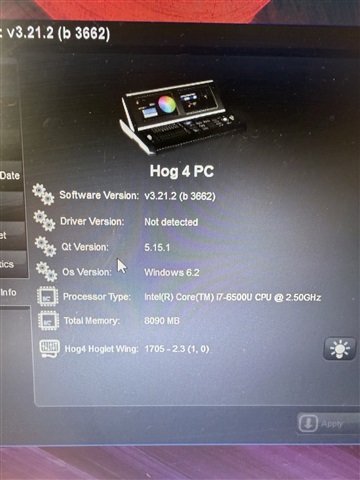
In the Start Window it says

  • Driver not detected (But I tried the re-installing guide from etc and it says it uses the newest driver for the hoglet)
  • When I try to click on „Start Processor“ it shows No Server. 
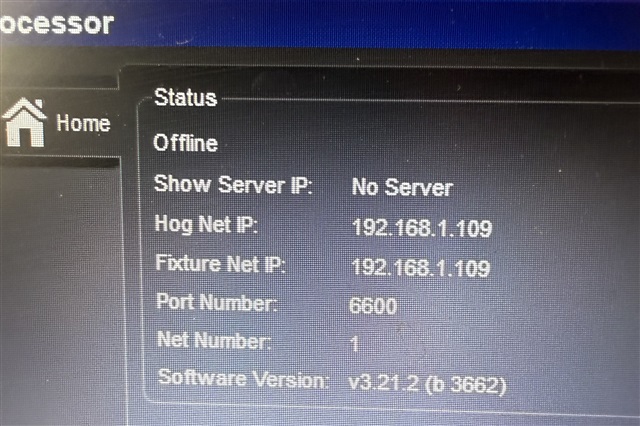
It detects the hoglet and I can use all faders and buttons. 

I loaded a new show and patched 4 fixtures and when I go to Setup > Network > Settings i cannot add the Widget as an output.
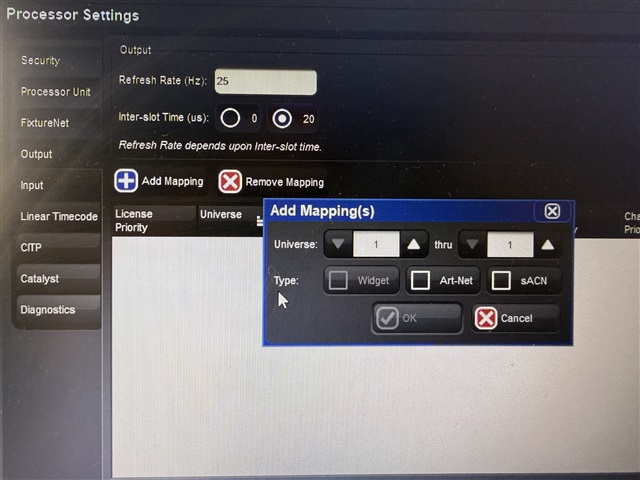
My firewall is deactivated, DMX is plugged in, everything has power, and I really don‘t know what I am missing.

I hope you can help me. Thank you!
Parents
  • Hello, if you don't already have a show programmed in V3.x, I suggest installing Hog PC v4.3.  Just download it and it will install right over what you have.  I would turn off Wi-Fi after this as well.  If you still can't map to the widget, I would open it up and see that you have active LED's on the internal DMX widget (power and data) and if yes, unplug the Hoglet and flip dipswitch 1 the other way on the DMX widget, plug in Hoglet/launch Hog PC again and see if you have it.  It should appear in the System Info window of the control panel from the start screen.  If not, there may be a hardware issue with the DMX card itself.  Is it still under warranty?  ETC/HES has a support line at 800-890-8989 if you want to speak to Hog Support for further assistance.

Reply
  • Hello, if you don't already have a show programmed in V3.x, I suggest installing Hog PC v4.3.  Just download it and it will install right over what you have.  I would turn off Wi-Fi after this as well.  If you still can't map to the widget, I would open it up and see that you have active LED's on the internal DMX widget (power and data) and if yes, unplug the Hoglet and flip dipswitch 1 the other way on the DMX widget, plug in Hoglet/launch Hog PC again and see if you have it.  It should appear in the System Info window of the control panel from the start screen.  If not, there may be a hardware issue with the DMX card itself.  Is it still under warranty?  ETC/HES has a support line at 800-890-8989 if you want to speak to Hog Support for further assistance.

Children
No Data