automark not working if master has no intens parameter

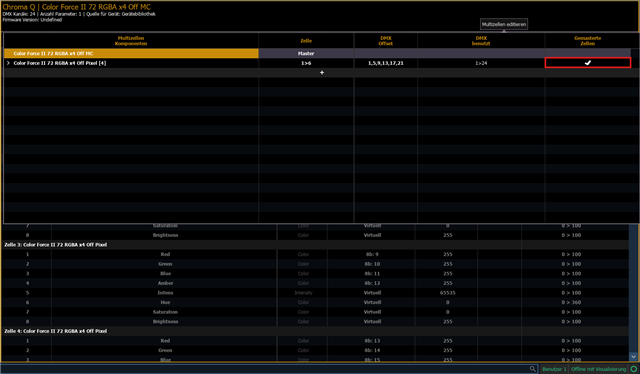
For a moving head multicell fixture I used to forget that I have to put both the master and cells intensities up to see light, even though I programmatically could do with only intensities on the cells, since the master intensity is basically just a multiplication factor on top of the cells intensities. So I went to the fixture profile in patch and changed the master intensity to locked value 255. Now when typing Chan 1 @ Full, the cells intensities would go to full, instead of the master intensity + I would have to select the cells and turn their intensities up as well.

But I think I found a roadblock, since now that the master doesn't have an intensity anymore, the moving head won't do proper automarks anymore, because automark apparently looks at the intensity of the master instead of the whole fixture (Augment3d on the contrary understands the change in fixture profile perfectly fine). I am on Element, so only automark is available.

I wanted to confirm that have no choice but to switch back to the double intensity fixture profile, if I want the automark to work for this moving head multicell fixture?

Parents
  • I have a second question. I have come across the following scenario: It is cue 1 and the master intensity is turned off. The cells are turned on and have color A. In the cue 2, the fixture does nothing. In cue 3, the cells should have color B. Since the cells were never turned off, the automark didn't do anything in cue 2, even though it could have faded the color from A to B, because the master was turned off, so it would have been invisible and that's what we want. But if I turn off both the master and the cells in cue 1, then it's not a linear down fade, but an exponential one. And if I don't turn off the master intensity, but only the cells intensities, the fixture could not do a focus automark in cue 2. And if I put color B into cue 2, this is basically a manual mark by setting the color parameter values in the dark cue yourself, which breaks the idea of automark.

    So what's the best way to balance between master intensity and cells intensities programming wise?

Reply
  • I have a second question. I have come across the following scenario: It is cue 1 and the master intensity is turned off. The cells are turned on and have color A. In the cue 2, the fixture does nothing. In cue 3, the cells should have color B. Since the cells were never turned off, the automark didn't do anything in cue 2, even though it could have faded the color from A to B, because the master was turned off, so it would have been invisible and that's what we want. But if I turn off both the master and the cells in cue 1, then it's not a linear down fade, but an exponential one. And if I don't turn off the master intensity, but only the cells intensities, the fixture could not do a focus automark in cue 2. And if I put color B into cue 2, this is basically a manual mark by setting the color parameter values in the dark cue yourself, which breaks the idea of automark.

    So what's the best way to balance between master intensity and cells intensities programming wise?

Children
  • Hi Lucas. 

    Can you tell us which fixture type you're using?

    Typically Cells should automark when the Master Cell is turned off if the cells are setup as Mastered Cells. You can try to set the cells as mastered cells in the Fixture editor and check if the fixture is now behaving like you expect. however, this might break some features of the fixture, if it was intentionally setup for the cells to not be mastered. 

    Setting the home value for the cell master as 255 in patch is not that nice of a workaround imho. you can restore the default profile by updating the fixture in the Fixture window in Patch and then set the cells as mastered cells in the fixture editor. 

    Usually, you shouldn't need to touch the default cell intensities if you're working with mastered cells. (Unless you're trying to do effects/fanned colors etc ofc.) 

    Hope this helps.

Related