
Magic Sheet Button Label Changes When Sending OSC

I’ve discovered a feature that is new to me, but at the same time I’ve also found a bug.

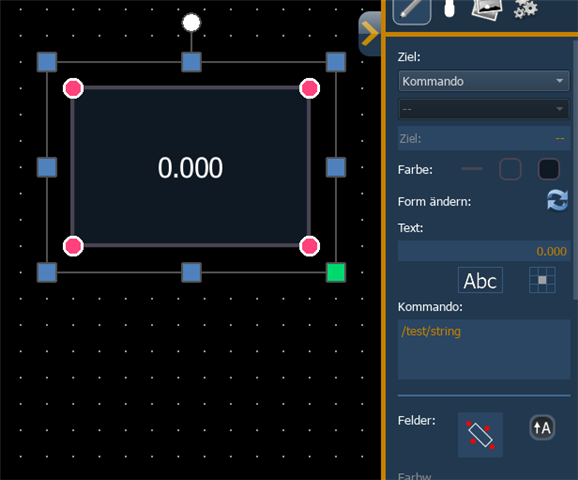
It is possible to send OSC without using a Macro, directly via a MagicSheet button. If you set a button’s target in command, you can simply enter the OSC string you want to send in the command field below. A signal is sent both when pressing the button and when releasing it. How great is that? You basically get a “tap” and “release” behavior – exactly what I need at the moment.

In the Diagnostics tab it looks like this:

[Global/UDP] SEND [OSC Packet] /test/string, 1.000(f)
[Global/UDP] SEND [OSC Packet] /test/string, 0.000(f)

Now to the bug: unfortunately, the argument of the OSC signal is written into the button’s text. So you end up with a button labeled “0.000”, for example. Of course, you could make that button invisible and place another button with the correct label on below of it, but that really shouldn’t be the intended solution.

This feature is great and very useful—hopefully it can stay, and the label issue can be fixed

I've using EOS 3.3.5. Build 69
Parents
  • Both the down edge / up edge behavior and the labeling are expected behavior.

    If you hover your mouse over the Command field you will get a tooltip showing what possibilities the command field offers. The same text is also available in the Eos manual. You can use the behavior with a single address where arguments of 0 or 1 are added, or you can define the down and up edges yourself using two addresses, the first one is the up edge, the second one the down edge:

    /device/slider=0.75
    /device/slider=0.25

    Command objects are meant to show you the argument of a specified OSC address, this is what you're seeing. If you feel this behavior should be changed or expanded in any way, feel free to add a feature request.

  • Ah, okay — I didn’t realize that the object text being overwritten by the argument is intended behavior.

    When I use

    /test/string=0
    /test/string=1

    the text label is not overwritten, and that actually works well for my use case. Thanks for pointing that out.

    One more question: is it possible to send two different OSC strings on button press and button release?
    For example:

    /test/string/release
    /test/string/press

    When I enter it like this, both commands are sent at the same time instead of on press and release.

Reply
  • Ah, okay — I didn’t realize that the object text being overwritten by the argument is intended behavior.

    When I use

    /test/string=0
    /test/string=1

    the text label is not overwritten, and that actually works well for my use case. Thanks for pointing that out.

    One more question: is it possible to send two different OSC strings on button press and button release?
    For example:

    /test/string/release
    /test/string/press

    When I enter it like this, both commands are sent at the same time instead of on press and release.

Children
No Data
Related