
Magic Sheet Button Label Changes When Sending OSC

I’ve discovered a feature that is new to me, but at the same time I’ve also found a bug.

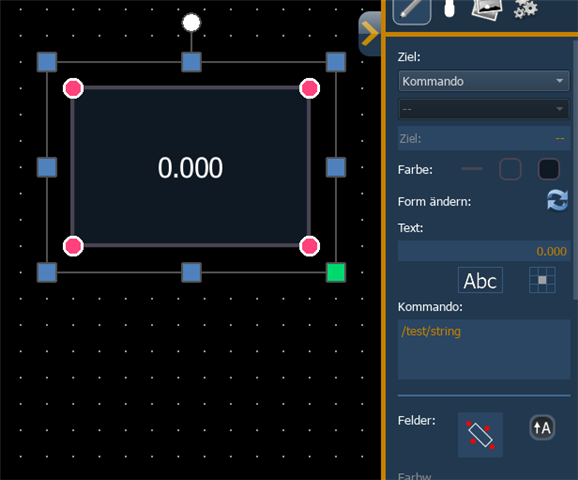
It is possible to send OSC without using a Macro, directly via a MagicSheet button. If you set a button’s target in command, you can simply enter the OSC string you want to send in the command field below. A signal is sent both when pressing the button and when releasing it. How great is that? You basically get a “tap” and “release” behavior – exactly what I need at the moment.

In the Diagnostics tab it looks like this:

[Global/UDP] SEND [OSC Packet] /test/string, 1.000(f)
[Global/UDP] SEND [OSC Packet] /test/string, 0.000(f)

Now to the bug: unfortunately, the argument of the OSC signal is written into the button’s text. So you end up with a button labeled “0.000”, for example. Of course, you could make that button invisible and place another button with the correct label on below of it, but that really shouldn’t be the intended solution.

This feature is great and very useful—hopefully it can stay, and the label issue can be fixed

I've using EOS 3.3.5. Build 69
Parents Reply Children
  • Okay, thanks for your help.

    We’ve now found a way to make this work. Our goal was to trigger a button in Bitfocus Companion, and it was important for us that the tap and release behavior works correctly. Unfortunately, Companion listens for two different OSC paths for tap and release, which doesn’t match what Eos sends:

    /location/<bank>/<row>/<column>/up
    /location/<bank>/<row>/<column>/down

    As a workaround, we’re now using the ETCLabs OSCRouter to translate the OSC commands. We created a route with the input path /tap/* and the following JavaScript as the output:

    location = OSC.split("/").slice(-3).join("/");
    if (ARGS == 1) {
        OSC = "/location/" + location + "/up";
        } 
    else {
        OSC = "/location/" + location + "/down";
        }

    Our MagicSheet buttons are sending the following commands:

    /tap/<bank>/<row>/<column>=0

    /tap/<bank>/<row>/<column>=1

    The JavaScript now translates all paths starting with /tap into the format that Companion expects.

    Maybe this description will be helpful for someone else as well.

Related