
Feature idea: simple relay / power control fixture type THOUGHTS?

Love to here what people do or if this sounds like a possible cool feature that people would use and i should move this to feature request.

Something that comes up fairly regularly for us is controlling DMX switched relays or dimmers that have a switched (bypass dim) mode.

At the moment on EOS the usual workaround is to patch them as a normal channel, bring them to full, and then park them so the relay stays on. When you want to turn the power off you unpark the channel.

This works fine, but it means using the park buffer as part of normal workflow. Personally I prefer to keep park empty unless I actually need it for something temporary, rather than having it full of channels that are just powering parts of the rig.

You can sort of solve it by making a custom fixture profile that’s just a single address control channel that goes 0 or full. The downside is there’s no really clean way to show its state on the screen. Most of the time the only way to see if it’s on or off is by checking DMX output or the sACN indicator.

It would be great if EOS had a simple fixture type designed for this kind of thing — basically a one address on/off control fixture for relays or switched dimmers.

One way this could work would be similar to the existing Remote Dimmer concept. For example in Patch you could add something like Remote Power, where you patch the DMX address of the relay. EOS would then automatically create a Part 2 power control for that fixture using a simple on/off power library profile.

Because it’s linked to the main fixture, the power state could then be visible directly in the UI — for example on the tombstone or Magic Sheets — with something simple like a red/green indicator or power icon showing whether that relay is on or off.

Alternatively it could still be patched as a standalone channel, but with a clear On / Off state indicator in the UI.

Programming-wise it should still behave like a normal channel so you could easily make macros to power up the rig, build relay groups, or query power state.

It would clean up a pretty common workflow, avoid using park as a power-management tool, and make controlling DMX relays or switched dimmers a lot clearer.

Curious if anyone else is doing similar things or has a different workflow for this.

If it’s linked to the main fixture it would be great if you could show the state in the tombstone or on Magic Sheets – something simple like a red/green dot or a power icon so you can immediately see whether that relay is on or off.

If it was a separate channel then just having a clear On/Off state indicator in the UI would already make a big difference.

Programming-wise it should still behave like a normal channel so you can easily make macros for things like powering up the rig, querying state, or building groups of relays.

This would remove the need to use park as a power-management tool and would make controlling DMX relays or switched dimmers a lot cleaner.

Curious if anyone else is doing similar things or has found a better workflow.

Above mockup from Remote Dimmer Fixture with a custom Fixture Power (Control channel Power - 0 is Power off Hold.  255 is Power On Hold
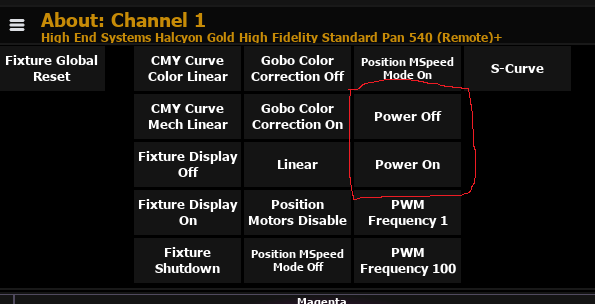

When you select Channel - it adds the Power off and on to its control channel

Parents
  • Hi Mylesie.

    In our House we have three stages, which use the approaches you mentioned already.

    On two stages (including the one I work on) we use an additional intensity parameter which is patched to the address of the relay. We then park this fixture parameter with our "Rig power on" macro"

    On our biggest Stage, they use lamp control parameters to "park" the relays.

    I believe there are some advantages and disadvantages to each workflow. With the intens parameter, you clutter up your park, which doesn't happen with lamp control parameters. However i do believe, with lamp control parameters, you're not able to jump showfiles and preserve power I haven't tested this extensively yet. Another downside to this workflow is that a fixtures power status isn't always obvious without looking at the physical output addresses.

    There's also the option to force those intensity parameters to stay on with a shielded sub. However i don't like this approach as much, since it clutters up the live summary with big yellow S's on all the Channels.

    I'm very interested in how other venues manage their power.

  • I run 2 venues in our performing arts centre.  Built in 1997, so no thought of power or relays for LEDs in the rig back then.

    Permanent house rig, unless the show needs to move things around.

    both Venues are running Ions.

    Both Ions have the same programming.

    on Boot Up, a macro is fired to park 10 channels (?) at various levels:

    LED/DMX splitter power to full (1 channel per level: stage, balcony, catwalk, and canopy above stage)

    Audience Aisle Lights, and backstage running lights and safety lights to various levels

    (and then the macro brings up my prefered snapshot, etc).

    the operator is then to Run Up some submaster fader handles (house lights, stage work lights, backstage/production worklights, house/decor minimum submasters, Aisle/Safety Lights with Relay Channels included, and Audience Light Lock minimum levels.

    Yes the Aisle/Relay sub is doing the same thing to the Parked Channels, but it acts as a safety (if the park buffer accidentally gets wiped) and also puts lables on the channels, rather than just hte small white P.  "what is this parked channel? oh its aisle light, and this one Moving Light power over the stage".

    At Shut Down, The operator needs to pull all fader handles down to 0 the subs. AND a macro fires to clear all Parked Channels and Parked addresses (in case there were any added).  

    That's how I handle power in my venue

    Andrew

Reply
  • I run 2 venues in our performing arts centre.  Built in 1997, so no thought of power or relays for LEDs in the rig back then.

    Permanent house rig, unless the show needs to move things around.

    both Venues are running Ions.

    Both Ions have the same programming.

    on Boot Up, a macro is fired to park 10 channels (?) at various levels:

    LED/DMX splitter power to full (1 channel per level: stage, balcony, catwalk, and canopy above stage)

    Audience Aisle Lights, and backstage running lights and safety lights to various levels

    (and then the macro brings up my prefered snapshot, etc).

    the operator is then to Run Up some submaster fader handles (house lights, stage work lights, backstage/production worklights, house/decor minimum submasters, Aisle/Safety Lights with Relay Channels included, and Audience Light Lock minimum levels.

    Yes the Aisle/Relay sub is doing the same thing to the Parked Channels, but it acts as a safety (if the park buffer accidentally gets wiped) and also puts lables on the channels, rather than just hte small white P.  "what is this parked channel? oh its aisle light, and this one Moving Light power over the stage".

    At Shut Down, The operator needs to pull all fader handles down to 0 the subs. AND a macro fires to clear all Parked Channels and Parked addresses (in case there were any added).  

    That's how I handle power in my venue

    Andrew

Children
No Data
Related