


Love to here what people do or if this sounds like a possible cool feature that people would use and i should move this to feature request.
Something that comes up fairly regularly for us is controlling DMX switched relays or dimmers that have a switched (bypass dim) mode.
At the moment on EOS the usual workaround is to patch them as a normal channel, bring them to full, and then park them so the relay stays on. When you want to turn the power off you unpark the channel.
This works fine, but it means using the park buffer as part of normal workflow. Personally I prefer to keep park empty unless I actually need it for something temporary, rather than having it full of channels that are just powering parts of the rig.
You can sort of solve it by making a custom fixture profile that’s just a single address control channel that goes 0 or full. The downside is there’s no really clean way to show its state on the screen. Most of the time the only way to see if it’s on or off is by checking DMX output or the sACN indicator.
It would be great if EOS had a simple fixture type designed for this kind of thing — basically a one address on/off control fixture for relays or switched dimmers.
One way this could work would be similar to the existing Remote Dimmer concept. For example in Patch you could add something like Remote Power, where you patch the DMX address of the relay. EOS would then automatically create a Part 2 power control for that fixture using a simple on/off power library profile.
Because it’s linked to the main fixture, the power state could then be visible directly in the UI — for example on the tombstone or Magic Sheets — with something simple like a red/green indicator or power icon showing whether that relay is on or off.
Alternatively it could still be patched as a standalone channel, but with a clear On / Off state indicator in the UI.
Programming-wise it should still behave like a normal channel so you could easily make macros to power up the rig, build relay groups, or query power state.
It would clean up a pretty common workflow, avoid using park as a power-management tool, and make controlling DMX relays or switched dimmers a lot clearer.
Curious if anyone else is doing similar things or has a different workflow for this.
If it’s linked to the main fixture it would be great if you could show the state in the tombstone or on Magic Sheets – something simple like a red/green dot or a power icon so you can immediately see whether that relay is on or off.
If it was a separate channel then just having a clear On/Off state indicator in the UI would already make a big difference.
Programming-wise it should still behave like a normal channel so you can easily make macros for things like powering up the rig, querying state, or building groups of relays.
This would remove the need to use park as a power-management tool and would make controlling DMX relays or switched dimmers a lot cleaner.
Curious if anyone else is doing similar things or has found a better workflow.
Above mockup from Remote Dimmer Fixture with a custom Fixture Power (Control channel Power - 0 is Power off Hold. 255 is Power On Hold
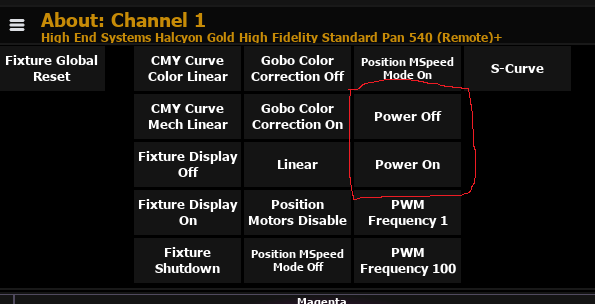
When you select Channel - it adds the Power off and on to its control channel
