
Custom Fixture Creation - Standards and assorted questions

Ahoy - this is a whole bunch of questions I've come across when creating fixture profiles for lights we use at our theatre and for lights I've borrowed from friends.

A lot of the fixtures I use aren't included in the fixture library (Usually weird imported China specials).  I know I can request them to be added on the Fixture Requests forum, but given that ETC don't have one of the fixtures in front of them and the DMX reference in the manual is sometimes wrong, I think I can do a pretty good job building the profiles myself.

When I do make the fixtures myself I try to get them as perfect as I can, but I've got a few questions:

My process for creating a fixture is I make a blank showfile and have just the one fixture in there (with maybe 3-6 different types for the different channel modes). This means I can merge in the file to any of the locations I work at and it will bring in only the fixture profiles (as there's nothing else in the file).

1. Is there a set of standards for how the inbuilt EOS Profiles are created - Ideally I'd like to build my profiles to follow the standards!
Speaking of the standards:  There's a lot of situations where multiple parameter names could apply.  Eg. a Light may let you pick 2 colours for the effects to run - You could call it "Color Effect Parameter Red", or "Background Color Red", or "Background Red".  I don't know what to do here - I just pick one and roll with it, but if there was another similar light but using different names, the parameters wouldn't transfer across...

2. Gobos - I've created Gobo images for one of my lights and the gobo wheel. When I merge my light into another show however, I need to make sure to select "Fixtures" and "Resources and Media" so it will import the gobo images.
The other issue importing a light with Gobos is I can't see any option to set the default gobo set for the fixture. When you add a light from the Fixture Library, the default colour wheel/Gobo wheels for the light are pre-set. But for a custom fixture there's no way to set that? 

3. Augment3D Models - Last I saw there's no way to import your own custom light models?  Is this still the case?
When creating a profile - is it bad if I use the Augment3D model of a different brand of light that closest represents the closest to the one I've got - or should I just use the Generic ones, even if they look way different.

4. When creating a fixture using the Wizard, it asks you to enter the Fixture Manufacturer/Model/Mode - the Mode setting just gets appended to the Fixture Model instead of going in the Mode field (Just a little bug?)

5. When a fixture has special macro modes where there may be as many as 70 or so different effects on a channel - do you just leave the channel as a 0-255 sort of channel and just label it an effect macro channel, or would you set it up with buttons for each effect?
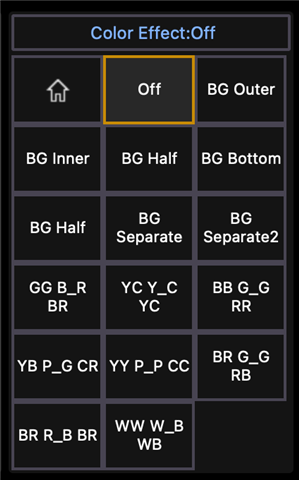
Example here - it's different combination of the foreground and background colour - then modes with set colours (it's a 9xLED Bee Eye style light, so GG B_R BR would be Top Row: Green Green; Middle Row Blue, Blank, Red; Bottom Row: Blue, Red).

6. For lights with multiple colour selections, it would be cool if you could have multiple colour pickers (like the example above with a foreground and background colour).

7. I'm not sure if GDTF is an answer to a lot of these questions, should I perhaps be looking down that path?

8. Does ETC take user made profiles and add them to the main fixture library?  I'm happy sharing the ones I've built!

Sorry for the blast of questions! 

Dustin - Community Theatre Lighting Tech Nerd

Parents
  • Thank you for reaching out!

    1. There is currently no published standard. But the Fixture Wizard should help you in showing which feature usually uses which parameter name.
    2. There is currently no way for custom fixtures to have their default gobo wheel come along. This is on our list to improve.
    3. This is still the case. Nothing bad will happen when you use another model from the library. Of course it helps if you can find a source fixture type that is similar.
    4. I'll look into that, thank you.
    5. I guess that's an example of having to find a balance between time spent vs comfort when using the profile. You can still control the fixture without the ranges but you'd need a list to somehow know the DMX values. But if you know you're not going to use this parameter anyway, then there's no harm in just leaving it as 0-255.
    6. Each channel only gets one color picker, which will control its primary set of colour control (e.g. Red/Green/Blue/White rather than Red2/Green2/... or BackgroundRed etc.). If you have a channel that provides multiple sets of colour control you can look into using the multicell feature. The cells each count as channel as well, so each cell gets a color picker as well. You could use the master cell for the color mixing set you'll use most and have a cell .1 that controls e.g. Background Color as Red/Green/Blue.
    7. GDTF is of course a way to import a missing fixture type. If you can find your fixture as GDTF while it's missing from the Eos library, use the GDTF. You might want to edit it a bit afterwards to better suit your specific needs but importing it can be a great shortcut.
    8. There is currently no workflow to incorporate user-made profiles into the library.

    Does this help?

Reply
  • Thank you for reaching out!

    1. There is currently no published standard. But the Fixture Wizard should help you in showing which feature usually uses which parameter name.
    2. There is currently no way for custom fixtures to have their default gobo wheel come along. This is on our list to improve.
    3. This is still the case. Nothing bad will happen when you use another model from the library. Of course it helps if you can find a source fixture type that is similar.
    4. I'll look into that, thank you.
    5. I guess that's an example of having to find a balance between time spent vs comfort when using the profile. You can still control the fixture without the ranges but you'd need a list to somehow know the DMX values. But if you know you're not going to use this parameter anyway, then there's no harm in just leaving it as 0-255.
    6. Each channel only gets one color picker, which will control its primary set of colour control (e.g. Red/Green/Blue/White rather than Red2/Green2/... or BackgroundRed etc.). If you have a channel that provides multiple sets of colour control you can look into using the multicell feature. The cells each count as channel as well, so each cell gets a color picker as well. You could use the master cell for the color mixing set you'll use most and have a cell .1 that controls e.g. Background Color as Red/Green/Blue.
    7. GDTF is of course a way to import a missing fixture type. If you can find your fixture as GDTF while it's missing from the Eos library, use the GDTF. You might want to edit it a bit afterwards to better suit your specific needs but importing it can be a great shortcut.
    8. There is currently no workflow to incorporate user-made profiles into the library.

    Does this help?

Children
Related